
Cybermeter in Gover: Complete Traficom Assessments Without Excel Headaches
In this blog post, we show how assessments using Traficom’s National Cyber Security Centre Cybermeter tool can be carried out in Gover.

December 22, 2025

10 minutes
Cybermeter in Gover: Complete Traficom Assessments Without Excel Headaches
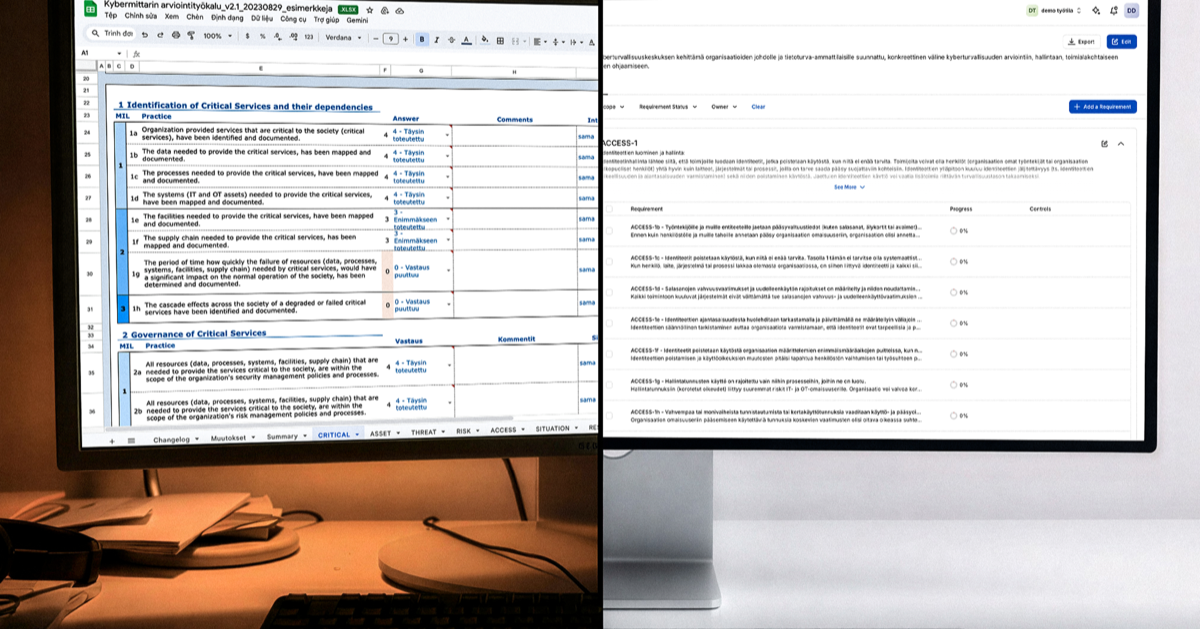
Cybermeter is a tool developed by Traficom’s National Cyber Security Centre and has established itself as one of Finland’s most important cybersecurity assessment models. It helps organizations determine their current cybersecurity posture or maturity level, identify areas for improvement, and manage information security in a systematic way.
While the model itself, which is based on the international C2M2 and NIST CSF frameworks, is excellent, its traditional Excel-based implementation can be cumbersome. File versioning, commenting via email, and manually tracking tasks take time away from actual development work.
Gover brings Cybermeter into a modern compliance workspace, making the assessment process smoother, more collaborative, and easier to follow. Organizations can work in real time, link risks and controls directly to Cybermeter requirements, leverage AI, and finally export the results back to Traficom’s official reporting format.
In this article, we walk through how Cybermeter works inside Gover, how the assessment is carried out, and how official reports are generated.
Scope selection
The Cybermeter assessment begins by selecting the part of the organization to be reviewed. In Gover, users can create an unlimited number of workspaces and invite exactly the experts and stakeholders whose input is needed for the specific assessment.
Once the workspace has been created, the main administrator, or any user with sufficient permissions, activates the Cybermeter framework and starts the assessment.
Cybermeter assessment process
The Cybermeter activated in Gover includes all official domains, such as risk management, situational awareness, and incident management, along with the related practices and guidelines.
During the assessment, the team reviews the selected practices and evaluates their implementation on a scale from 0 to 4. Each practice has a defined target level, MIL (Maturity Indicator Level), which helps the organization align its objectives and scope the assessment according to its needs.
Each practice is supported by a detailed description. Users can also request assistance from Gover’s AI assistant. The assistant has access to Cybermeter materials and general cybersecurity guidance, enabling it to clarify requirements in natural language and provide examples of implementation approaches.
Development actions and controls
Once the current state has been assessed and scored, it is time to create a development plan and assign responsibilities.
We recommend that the organization creates or links at least one control to each practice that requires improvement and assigns an owner to it. The control owner can then break the work down into concrete tasks and delegate them to the appropriate experts within the organization.
When all tasks related to a control have been completed, the control is considered implemented.
When all controls related to a practice have been implemented, the practice itself can be marked as completed.
In the next assessment, or at any time, the organization can review the practice again and update its score on the Cybermeter scale from 0 to 4.
The real strength of Gover is that the same controls can be linked to multiple frameworks, for example ISO 27001 and Cybermeter. When a control is implemented once, it improves the maturity level simultaneously across all relevant frameworks.
Risk management is also seamlessly integrated. Information security risks can be linked directly to Cybermeter practices as internal references. Risks are assessed within Gover, and their mitigation actions create new controls and tasks that connect back to Cybermeter.
Report generation
Traficom’s Excel-based Cybermeter includes excellent reporting features that make it easy to compare results and communicate them to stakeholders. Gover leverages these existing, official templates.
The process works so that the organization completes all work and data entry in Gover’s modern interface. The data is then exported to the official Cybermeter Excel file for report generation.
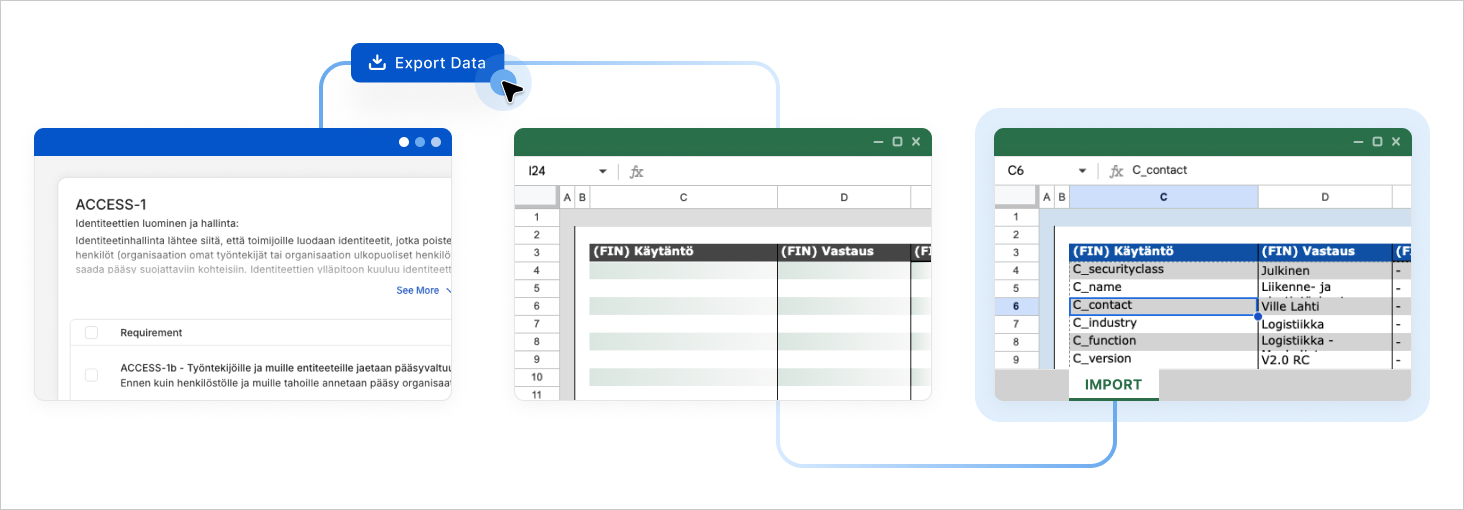
Step by step process:
The user completes the Cybermeter assessment in Gover and fills in all required fields.
On the Cybermeter page in Gover, the user clicks “Export”.
The user opens an empty, official Cybermeter Excel workbook.
The user copies the columns exported from Gover, such as “Score”, “Comments”, “Internal references”, and “Development need”.
The data is pasted into the “Import” sheet of the Cybermeter Excel file starting from the correct row, usually practice “ACCESS-1a”.
The data is then automatically processed by the Excel calculations. If you want to compare the results with previous assessments, you can copy the data from the earlier assessment into the corresponding columns according to the Excel instructions.
Congratulations. You have now completed the Cybermeter assessment using a modern tool and produced reports that fully comply with Traficom’s official format. The results are ready to be shared forward or presented to management.
Reviewing Traficom-style maturity reports
After exporting the data to the Cybermeter workbook, you can review all visual reports exactly as designed by Traficom.
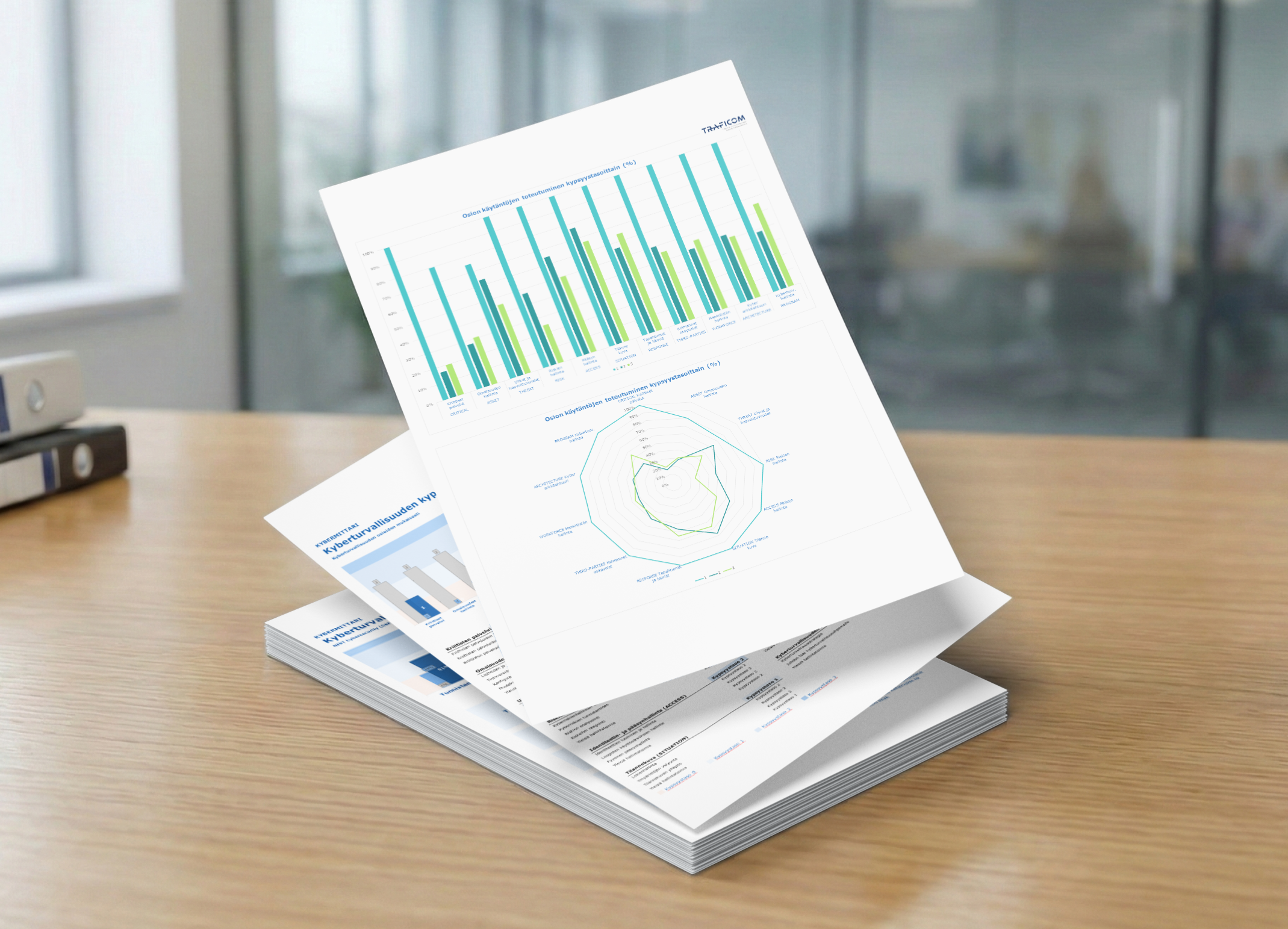
This includes, among other things, a NIST Cybersecurity Framework Core (CSF v1.1) compatible view. The workbook generates clear charts that illustrate your organization’s performance across five main functions: Identify, Protect, Detect, Respond, and Recover. Color coded visuals and weighted scoring help communicate the current state of cybersecurity in a clear and structured way.
These reports provide a standardized and reliable way to communicate maturity levels to management, auditors, and partners. Gover handles collaboration and data quality management, while the official Cybermeter workbook takes care of the final reporting in accordance with the required format.

Related blogs & news
Stay Ahead with Fresh News and Expert Tips


What is the NIS2 Directive?
The NIS2 Directive is coming into force in Finland in 2025. Essential and important service providers must significantly improve their cybersecurity.

What is the CER Directive?
The CER Directive strengthens the resilience of critical entities and infrastructure essential to society across the entire EU.

What is ISO 42001?
ISO/IEC 42001 is the first international standard for an AI Management System (AIMS). It aligns well with the EU AI Act.

Universal Compliance.
Manage Risk. Build Trust.
Gover turns complex compliance into a simple workflow that adapts to any legal, regulatory or sector-specific standard, with enterprise-grade risk management.

100+ standards and regulations
24/7 support
Easy to get started